More on AI Image Processing
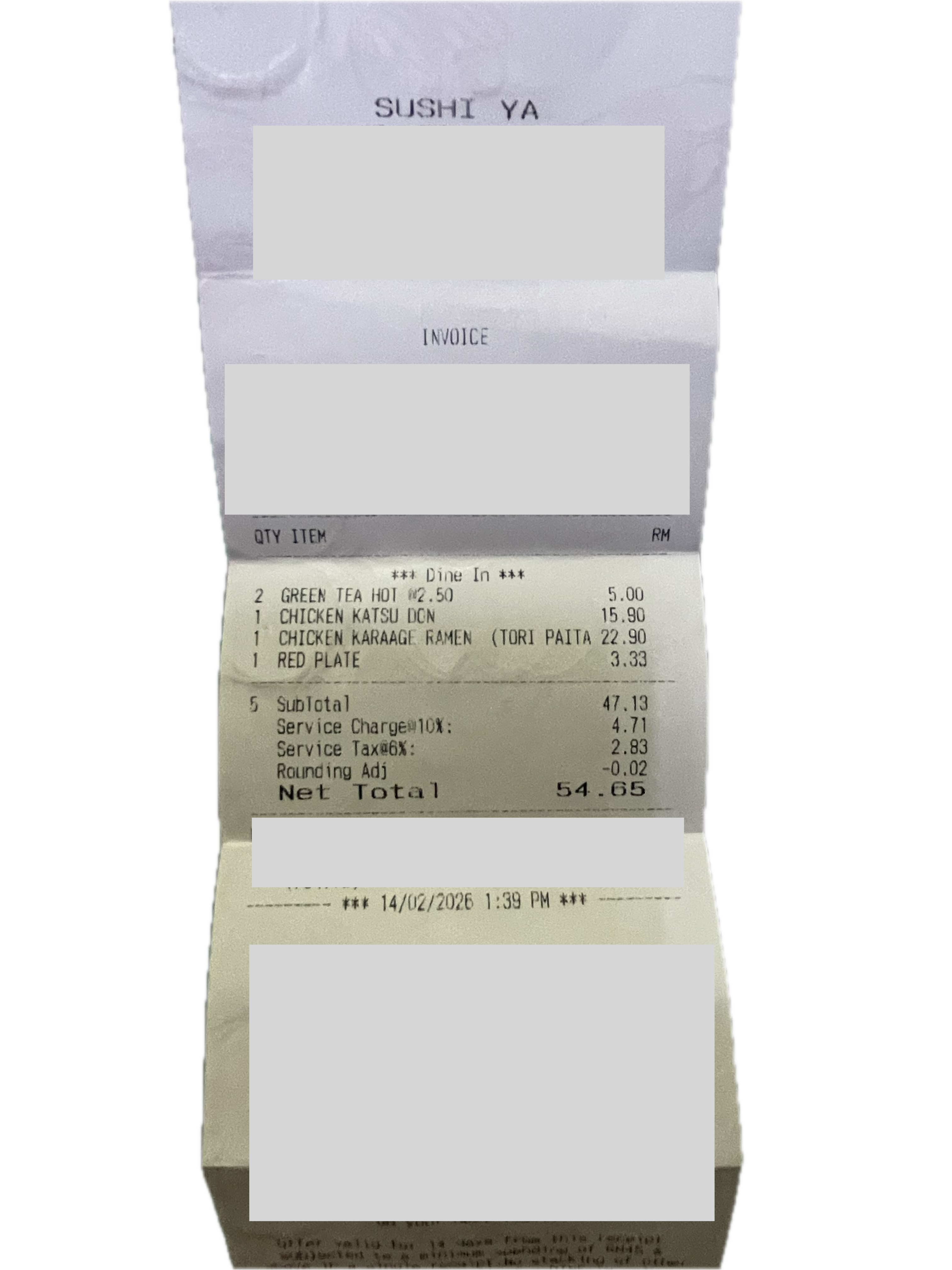
In my “Receipt Tracker” project (https://github.com/muzamono/receipt-tracker), one of the main aims is to implement image processing of payment receipts to directly input the expenses data into the app.
Testing Claude.ai image processing through the chat interface returned promising result, but I'm not ready to jump the gun by subscribing to any LLM yet. Searching for inexpensive method to test this method, I came to 2 options: Leveraging LLM's (Gemini or DeepSeek) for the whole extraction, or the combination of free OCR tool (e.g., Tesseract, or a cloud OCR API) to convert the receipt image to raw text, then send that text to DeepSeek with JSON-extraction prompt.
I will talk about the first option for this post.
Gemini gives free tier access to API, but trying to extract image data using hardcoded model number (gemini-2.0-flash or gemini-2.5-flash) proved fruitless with 429 RESOURCE_EXHAUSTED error. However, further interrogation with Gemini helped me to gain a helpful intel; model = ‘gemini-flash-latest’, which will automatically route the request to whichever active Flash model has free-tier quota allocated for the key type.
response = client.models.generate_content(
        model="gemini-flash-latest",
        contents=[processed_img, prompt],
        config=types.GenerateContentConfig(
            response_mime_type="application/json",
            response_schema=ReceiptData,  # Enforces structured output schema
            temperature=0.1,              # Strict accuracy for financial data
        ),
    )
Now that returned the result below with impressive accuracy compared to the sample image used. (Image at the top of the post.)
{
  "merchant": "SUSHI YA",
  "date": "2026-02-14",
  "total_amount": 54.65,
  "currency": "MYR",
  "category": "Food",
  "line_items": [
    {
      "name": "GREEN TEA HOT",
      "quantity": 2.0,
      "unit_price": 2.5,
      "total": 5.0
    },
    {
      "name": "CHICKEN KATSU DON",
      "quantity": 1.0,
      "unit_price": 15.9,
      "total": 15.9
    },
    {
      "name": "CHICKEN KARAAGE RAMEN (TORI PAITA",
      "quantity": 1.0,
      "unit_price": 22.9,
      "total": 22.9
    },
    {
      "name": "RED PLATE",
      "quantity": 1.0,
      "unit_price": 3.33,
      "total": 3.33
    }
  ],
  "extraction_confidence": "high"
}
Gemini is quite promising for this use case, though my sample number is really small and not robust for production level yet.
Now, onto DeepSeek.
Quick test of sample image with DeepSeek chat function returned promising results, but it turned out that the API models cannot receive input in image format (yet). So currently it is out of my consideration.
All in all, I can say that Gemini API is capable of extracting data from images even in free tier and is usable in testing environment. As for implementing which method of data extraction, I may need to run further tests.